


Windows Disk Cleanup Alternative
- Published on
- -1 min read
To keep a PC running smoothly, regular maintenance is critical. Many users shy away from maintenance tasks, thinking it is a long, drawn out manual affair, but the Disk Cleanup Utility can easily determine which files on a hard drive may no longer be needed and delete those files. In addition to freeing up potentially significant amounts of hard drive space, using a Disk Cleanup on a regular basis can significantly improve system performance.
I have always used Microsoft Windows Disk Cleanup and I was interested in seeing if there were any free software that could do a better job. After trawling through the net I was surprised to find how many programs claim to help you get back your PC into original working condition by removing all the clutter. Just as I expected most of the Disk Cleaning utilities were not free. But I did find one cleanup utility that fitted the mark quite nicely called Cleanup (well what else would it be called  !).
!).
CleanUp is a powerful and easy-to-use application that removes temporary files created while surfing the web, empties the Recycle Bin, deletes files from your temporary folders and more. It frees disk space and reduces the "clutter" on your computer helping it to run more efficiently. It also can be used as a way to protect your privacy on the Internet. You can even instruct CleanUp to securely delete files making it impossible to retrieve their contents using lower-level disk tools - just another way of protecting your privacy.
You can download the program here.
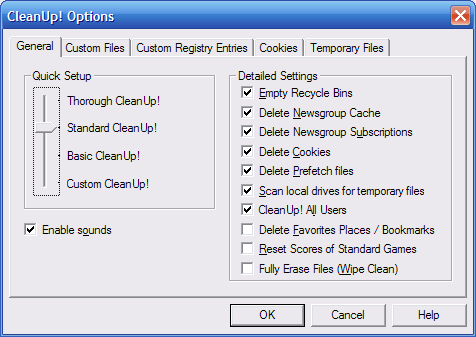
WARNING!: This program is a really thorough piece of kit because it can even delete your Bookmarks if you have not selected the right options:
Before you go...
If you've found this post helpful, you can buy me a coffee. It's certainly not necessary but much appreciated!

Leave A Comment
If you have any questions or suggestions, feel free to leave a comment. I do get inundated with messages regarding my posts via LinkedIn and leaving a comment below is a better place to have an open discussion. Your comment will not only help others, but also myself.
Categories
Support
If you've found anything on this blog useful, you can buy me a coffee. It's certainly not necessary but much appreciated!